UZAIR ALI

SMART HOME SECURITY

Home Secure

A smart home security interface designed to help users monitor their home, manage connected security devices, review activity, and respond quickly to security events.

PROJECT OVERVIEW

Designing a Connected Home Security Experience

Home Secure brings essential home-security functions into a single digital interface. The experience allows users to monitor cameras, control access points, review security activity, receive motion alerts, manage emergency actions, and configure automation and notification settings.

Project Type

Smart Home Security UI

Deliverables

Home Security Interface

Camera Monitoring

Security Controls

Emergency Controls

Activity Monitoring

Design Focus

User Experience

Information Hierarchy

Security Monitoring

Device Control

TOOLS & SKILLS

Tools & Skills

The project focuses on interface design, information organization, interaction, and the presentation of security-related functions.

UI/UX Design
Interface Design
Information Architecture
Visual Hierarchy
Interaction Design
Dashboard Design
Mobile App Design
Security UX
User Interface Design
DESIGN CHALLENGE

Making Home Security Easy to Monitor

The interface brings together many security functions, so information and controls need to
remain clear and accessible while users monitor their home or respond to an event.
01 ─────

Security Status

Present the current security state clearly so users can quickly understand whether the system is armed or disarmed and take action when needed.

02 ─────

Device Control

Give users direct access to important connected devices such as doors, cameras, locks, and other home-security controls.

03 ─────

Security Monitoring

Make motion events, footage, access history, and live camera information easy to review from the security interface.

04 ─────

Emergency Response

Provide a dedicated emergency mode with clear actions for situations requiring an immediate response.

SECURITY EXPERIENCE

A Complete View of Home Security

Home Secure brings monitoring, access, activity, and automation functions together so users can manage different aspects of their home security from one interface.

01 ─────

Live Monitoring

Monitor connected areas and cameras while accessing controls for recording, sound, communication, and snapshots.

02 ─────

Access & Activity

Review door access and security events through access history, motion alerts, and the activity timeline.

02 ─────

Automation & Alerts

Configure automated security actions and notifications for everyday protection.

CORE FEATURES

Connected Security Features

Home Secure brings monitoring, access, activity, and automation functions together so users can
manage different aspects of their home security from one interface.
01 ─────

Live Cameras

Monitor different areas including the Front Door, Backyard, and Garage.

02 ─────

Smart Lock

Control the Front Door lock directly from the interface.

03 ─────

Motion Alerts

Receive information about detected motion and access associated footage.

04 ─────

Home Map

Access a visual home/security overview.

05 ─────

Emergency Mode

Access emergency actions from a dedicated security control.

06 ─────

Activity Timeline

Review chronological security events and actions.

APP INTERFACE

Home Secure Interface

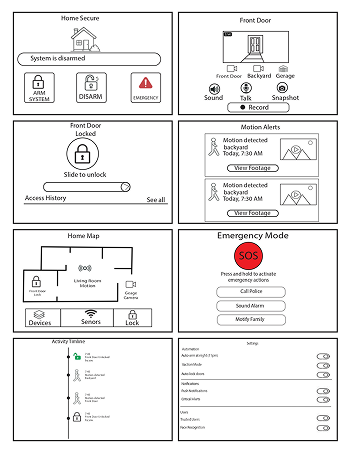
The interface organizes monitoring, access control, alerts, and home-management functions into a connected security experience.

Security Dashboard

Centralize system status and important security controls for quick access.

Live Monitoring

Provide direct access to camera views and monitoring controls.

Access Management

Allow users to control and monitor door access.

Activity Visibility

Present security events and activity history in a chronological format.

EMERGENCY & ACTIVITY

Responding to Security Events

Emergency Mode

Emergency Mode provides immediate access to security actions including calling police, sounding the alarm, and notifying family.

Activity Timeline

The activity timeline records security events such as door access and detected motion, helping users review what happened and when.

FINAL UI GALLERY

Home Secure Interface Collection

A visual collection of the Home Secure security interface, highlighting monitoring, access control, alerts, emergency
actions, activity history, and connected-device management.
NEXT PROJECT

RacerX

BRAND IDENTITY DESIGN

A playful and accessible brand identity for RacerX, designed to communicate fun, adventure, inclusivity, and excitement while remaining clear and recognizable across digital and print applications.